Calvia AI Food Calorie Tracker2.1.4
Publisher Description


Calvia makes healthy eating easier.
Track your meals, calories, macros, fasting, and progress in one simple app. Snap a photo of your food, get instant nutrition estimates, plan your meals, explore recipes, and stay on track with tools built around your goals.
Whether you want to lose weight, maintain your weight, or build better eating habits, Calvia helps you stay consistent without making tracking feel like a chore.
SNAP IT. WE’LL DO THE MATH.
Skip manual logging. Calvia uses AI to recognize your food from a photo and estimate calories and macros in seconds.
Just snap, review, and log.
Fast, simple, and built for real life.
BUILT AROUND YOUR GOALS
Set your current weight, goal weight, and nutrition goal, and Calvia creates a personalized daily calorie target based on your needs.
Track calories, protein, carbs, fat, and more with a clean dashboard that keeps everything clear and easy to follow.
TRACK WHAT MATTERS
Log breakfast, lunch, dinner, and snacks in seconds.
See your daily intake, remaining calories, and macro balance at a glance.
No clutter. No overthinking. Just the numbers you need.
PLAN MEALS WITH LESS EFFORT
Stay organized with a built-in meal planner that helps you prepare for the day ahead.
Build meals around your calorie target, reduce decision fatigue, and make healthier choices more consistently.
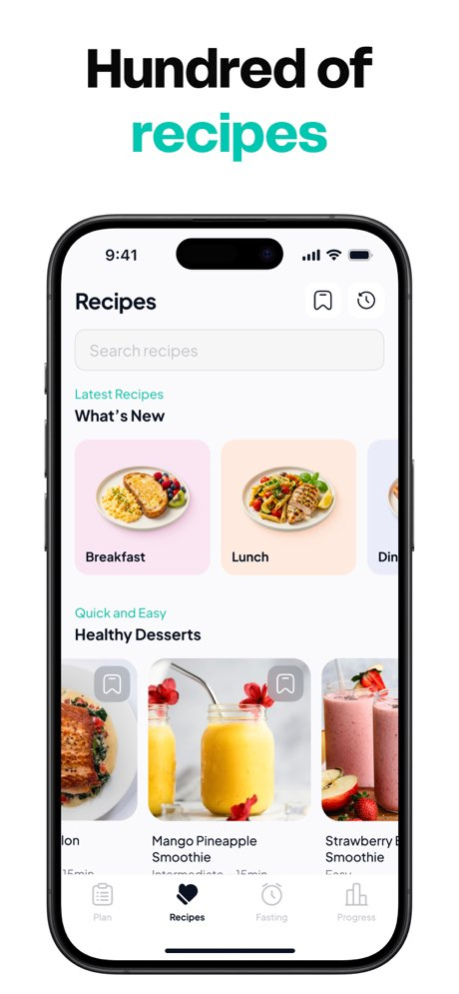
DISCOVER RECIPES YOU’LL ACTUALLY USE
Browse a growing collection of meals and recipes with nutrition information included.
From quick breakfasts to balanced lunches, lighter dinners, and healthy snacks, Calvia helps you find meals that fit your goals and your routine.
FAST SMARTER
Use the built-in fasting timer to track your fasting windows with ease.
Set your schedule, monitor your progress, and stay consistent with a simple fasting tool that works alongside your nutrition plan.
SEE YOUR PROGRESS WEEK BY WEEK
Track your weight, nutrition, and daily habits with visual insights designed to keep you motivated.
See how small actions add up over time and stay focused on long-term progress.
FEATURES
. AI food scanner for quick meal logging
. Instant calorie and macro estimates
. Personalized daily calorie goals
. Macro tracking for protein, carbs, and fat
. Built-in meal planner
. Fasting timer
. Large recipe library
. Weight and progress tracking
. Clean, easy-to-use design
Some features, including AI-powered food recognition and certain advanced tools, require an active subscription.
Terms and Conditions: https://calviaapp.ai/terms
Privacy Policy: https://calviaapp.ai/privacy
Version History Minor improvements and bug fixes 2.1.4 Sep 4 Minor improvements and bug fixes 2.1.3 Aug 27 Minor improvements and bug fixes 2.1.2 Aug 26 Minor improvements and bug fixes 2.1.1 Aug 24 NEW: Import recipes from Instagram and TikTok
Spotted a recipe you love on social? Just tap Share, choose Calvia, and we'll turn it into a complete recipe in seconds - no typing.
- Import from Instagram, TikTok, or any recipe link: share a post or paste a URL
- Automatic nutrition: calories, protein, carbs and fat, per serving
- Ingredients, servings, and step-by-step instructions detected for you
- Saved straight to your Recipes tab, ready to log in one tap
Plus performance improvements and bug fixes. Thanks for cooking with Calvia! 2.1 Aug 21 Minor improvements and bug fixes 2.0.2 May 20 Minor improvements and bug fixes 2.0.1 May 8 Minor improvements and bug fixes 2.0 Apr 27 1.0 Feb 23
About Calvia AI Food Calorie Tracker
The company that develops Calvia AI Food Calorie Tracker is PIXERY BILGI TEKNOLOJILERI ANONIM SIRKETI. The latest version released by its developer is 2.1.4.
To install Calvia AI Food Calorie Tracker on your iOS device, just click the green Continue To App button above to start the installation process. The app is listed on our website since 2026-10-14 and was downloaded 0 times. We have already checked if the download link is safe, however for your own protection we recommend that you scan the downloaded app with your antivirus. Your antivirus may detect the Calvia AI Food Calorie Tracker as malware if the download link is broken.
How to install Calvia AI Food Calorie Tracker on your iOS device:
- Click on the Continue To App button on our website. This will redirect you to the App Store.
- Once the Calvia AI Food Calorie Tracker is shown in the iTunes listing of your iOS device, you can start its download and installation. Tap on the GET button to the right of the app to start downloading it.
- If you are not logged-in the iOS appstore app, you'll be prompted for your your Apple ID and/or password.
- After Calvia AI Food Calorie Tracker is downloaded, you'll see an INSTALL button to the right. Tap on it to start the actual installation of the iOS app.
- Once installation is finished you can tap on the OPEN button to start it. Its icon will also be added to your device home screen.
Program Details
System requirements
Download information
Pricing
Version History
version 2.1.4
posted on 2026-10-14
Version History Minor improvements and bug fixes 2.1.4 Sep 4 Minor improvements and bug fixes 2.1.3 Aug 27 Minor improvements and bug fixes 2.1.2 Aug 26 Minor improvements and bug fixes 2.1.1 Aug 24 NEW: Import recipes from Instagram and TikTok
Spotted a recipe you love on social? Just tap Share, choose Calvia, and we'll turn it into a complete recipe in seconds - no typing.
- Import from Instagram, TikTok, or any recipe link: share a post or paste a URL
- Automatic nutrition: calories, protein, carbs and fat, per serving
- Ingredients, servings, and step-by-step instructions detected for you
- Saved straight to your Recipes tab, ready to log in one tap
Plus performance improvements and bug fixes. Thanks for cooking with Calvia! 2.1 Aug 21 Minor improvements and bug fixes 2.0.2 May 20 Minor improvements and bug fixes 2.0.1 May 8 Minor improvements and bug fixes 2.0 Apr 27 1.0 Feb 23
version 2.1.4
posted on 2026-09-05
Version History Minor improvements and bug fixes 2.1.4 18h ago Minor improvements and bug fixes 2.1.3 Aug 27 Minor improvements and bug fixes 2.1.2 Aug 26 Minor improvements and bug fixes 2.1.1 Aug 24 NEW: Import recipes from Instagram and TikTok
Spotted a recipe you love on social? Just tap Share, choose Calvia, and we'll turn it into a complete recipe in seconds - no typing.
- Import from Instagram, TikTok, or any recipe link: share a post or paste a URL
- Automatic nutrition: calories, protein, carbs and fat, per serving
- Ingredients, servings, and step-by-step instructions detected for you
- Saved straight to your Recipes tab, ready to log in one tap
Plus performance improvements and bug fixes. Thanks for cooking with Calvia! 2.1 Aug 21 Minor improvements and bug fixes 2.0.2 May 20 Minor improvements and bug fixes 2.0.1 May 8 Minor improvements and bug fixes 2.0 Apr 27 1.0 Feb 23
version 2.1.3
posted on 2026-08-28
Version History Minor improvements and bug fixes 2.1.3 1h ago Minor improvements and bug fixes 2.1.2 1d ago Minor improvements and bug fixes 2.1.1 3d ago NEW: Import recipes from Instagram and TikTok
Spotted a recipe you love on social? Just tap Share, choose Calvia, and we'll turn it into a complete recipe in seconds - no typing.
- Import from Instagram, TikTok, or any recipe link: share a post or paste a URL
- Automatic nutrition: calories, protein, carbs and fat, per serving
- Ingredients, servings, and step-by-step instructions detected for you
- Saved straight to your Recipes tab, ready to log in one tap
Plus performance improvements and bug fixes. Thanks for cooking with Calvia! 2.1 6d ago Minor improvements and bug fixes 2.0.2 May 20 Minor improvements and bug fixes 2.0.1 May 8 Minor improvements and bug fixes 2.0 Apr 27 1.0 Feb 23
version 2.0.2
posted on 2026-08-08
Version History Minor improvements and bug fixes 2.0.2 May 20 Minor improvements and bug fixes 2.0.1 May 8 Minor improvements and bug fixes 2.0 Apr 27 1.0 Feb 23
